Threat Hunt
Hypothesis
Every wmiexec command runs through a
/Q /c shell that redirects output to \ADMIN$\__<epoch>. That redirect in the command line is a high-fidelity signature, and it survives the adversary rotating credentials, commands, or source host.
Method
Detonate wmiexec on a lab host, pull S1 telemetry through Surveyor (PowerQuery), dedup to one row per command, recover command time from the redirect filename, triage in Data Wrangler.
Findings
True positive. One query recovered the full session on one host: 11 commands across discovery, AV discovery, disabling Defender, and a SAM dump, in under ten minutes.
Platform
SentinelOne, Surveyor, Jupyter, Pandas, Data Wrangler
MITRE ATT&CK
T1047
T1021.003
T1021.002
T1059.003
T1518.001
T1685
T1003.002
wmiexec is one of the first tools an operator reaches for with valid credentials. It's part of impacket, doesn't install a service or drop a binary the way PsExec does, and works with a password or an NTLM hash, which makes it common in real intrusions. I detonated it against a Windows host in my lab to see what it leaves behind in SentinelOne, with no question of impact or attribution since I was the one running it.
The goal was a query durable enough to survive the adversary swapping out credentials, source address, and commands, because it keys on how wmiexec works rather than any one run.
The Technique
wmiexec gives you a semi-interactive shell over WMI. It authenticates over DCOM and uses the Win32_Process.Create method to start a process on the remote machine. The catch is that Win32_Process.Create is fire and forget: it returns a process ID, not the command's output. So wmiexec has to handle output itself. It redirects each command's stdout and stderr to a file on the target's ADMIN$ share (which maps to C:\Windows), reads it back over SMB, and deletes it. Every command runs through cmd.exe like this:
cmd.exe /Q /c <command> 1> \\127.0.0.1\ADMIN$\__<timestamp> 2>&1/Q is quiet mode, /c runs and exits, 1> redirects stdout to the share file, and 2>&1 folds in stderr. The filename is two underscores plus time.time() from the operator's machine, fresh per command. The default UNC host is 127.0.0.1, which an operator can change, so I didn't build the hunt on it.
The \ADMIN$\__ redirect is what wmiexec can't drop. A semi-interactive shell over a fire-and-forget API has to write its output somewhere it can read back over SMB, and that write is in the command line of every command. That's the chokepoint. There's no service or dropped binary either, so PsExec-style service detections never see it.
Building the Hunt
I pulled the telemetry with Red Canary's Surveyor, which runs a query against the SentinelOne API and writes the results to CSV. Driving it from a Jupyter notebook is what makes this scale: Surveyor can fan the same query across every customer S1 environment in one pass, and the notebook pulls all of it into one Pandas frame to dedup and triage in Data Wrangler. For a SOC watching a fleet of tenants, that beats running the query by hand in each console. Surveyor defaults to S1's PowerQuery engine, and the whole hunt is one query:
src.process.cmdline contains "/Q /c" and src.process.cmdline contains "\\ADMIN$\\__"Two predicates: the /Q /c every capture shell carries, and the \ADMIN$\__ redirect (S1 escapes a backslash as \\). I didn't filter on parent process. The parent name and image fields came back empty in PowerQuery, so a WmiPrvSE.exe filter would have dropped the whole session. The command line carried it alone.
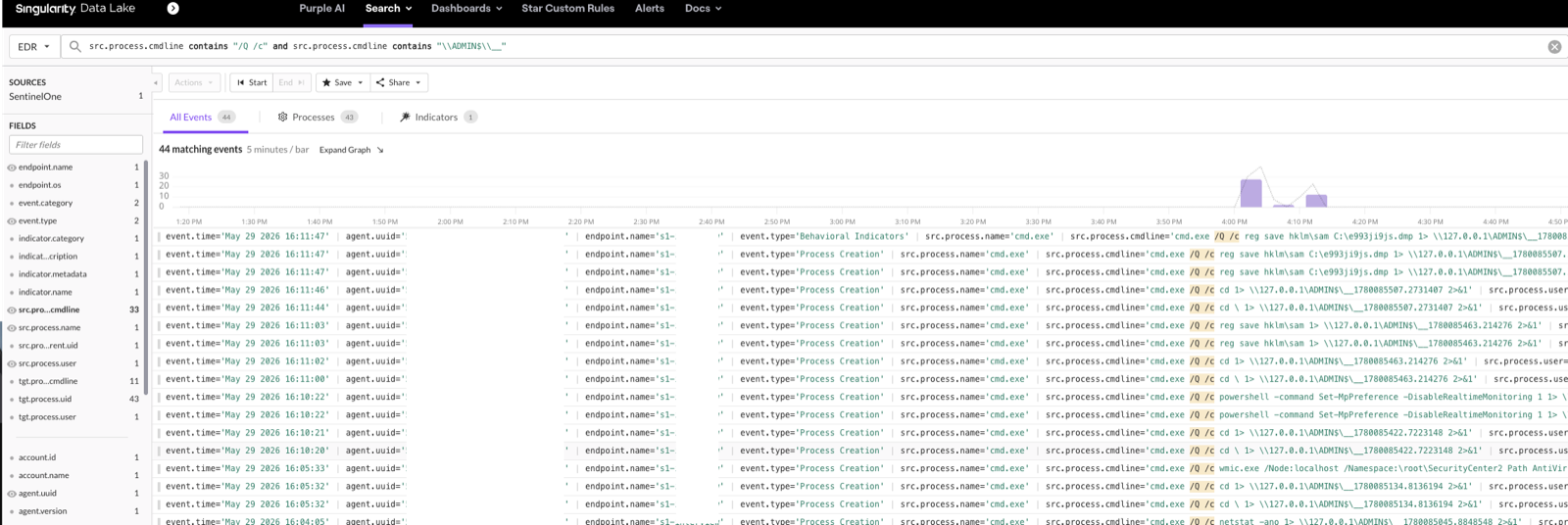
SentinelOne returns a row per child process, so each command repeats. The output filename is unique per command, so identical command lines are the same execution and I collapse on them:
df = df.drop_duplicates(subset=["query_name", "cmdline"]).reset_index(drop=True)Operator command time from the filename
The __<timestamp> filename is more useful than it looks. impacket builds it from time.time() on the operator's machine when the command is sent, so the operator's command time is baked into the redirect path, independent of when the sensor recorded the event:
epoch = df["cmdline"].astype(str).str.extract(r"\\ADMIN\$\\__(\d{9,11}\.\d+)", expand=False).astype(float)
df.insert(1, "redirect_epoch", epoch)
df.insert(2, "redirect_time_utc", pd.to_datetime(epoch, unit="s", utc=True))
Sorted by that column, the session reads like a transcript: one host, 20:02:19 to 20:11:47 UTC, under ten minutes.
What It Looks Like in Telemetry
After dedup the query returned 33 rows on one host, collapsing to 11 commands the operator actually typed. The rest is wmiexec's own cd probes for tracking the working directory, sharing the same __<timestamp> file as the command they precede. One command in full, as it lands in the cmdline column:
cmd.exe /Q /c whoami 1> \\127.0.0.1\ADMIN$\__1780084939.1144483 2>&1Stripping the wrapper and sorting by recovered time, it's a textbook hands-on-keyboard sequence:
| Time (UTC) | Command | What it's doing |
|---|---|---|
| 20:02:19 | whoami | Current user (T1033) |
| 20:02:41 | ipconfig /all | Network configuration (T1016) |
| 20:02:52 | net use | Mapped connections (T1016) |
| 20:03:17 | net user | Local accounts (T1087.001) |
| 20:03:26 | net share | Shared folders (T1135) |
| 20:03:47 | net localgroup | Local groups (T1087.001) |
| 20:04:05 | netstat -ano | Active connections (T1049) |
| 20:05:34 | wmic ... SecurityCenter2 ... AntiVirusProduct Get displayName | Installed AV product (T1518.001) |
| 20:10:22 | powershell Set-MpPreference -DisableRealtimeMonitoring 1 | Disable Defender real-time (T1685) |
| 20:11:03 | reg save hklm\sam | SAM hive dump (T1003.002) |
| 20:11:47 | reg save hklm\sam C:\<file>.dmp | SAM hive dump to file (T1003.002) |

Discovery first (user, network, accounts, shares, groups, connections), then a SecurityCenter2 query for the installed AV, then disabling Defender's real-time monitoring, then two SAM hive dumps, the second written to disk. In that order, under ten minutes. The SAM dump is the loudest line:
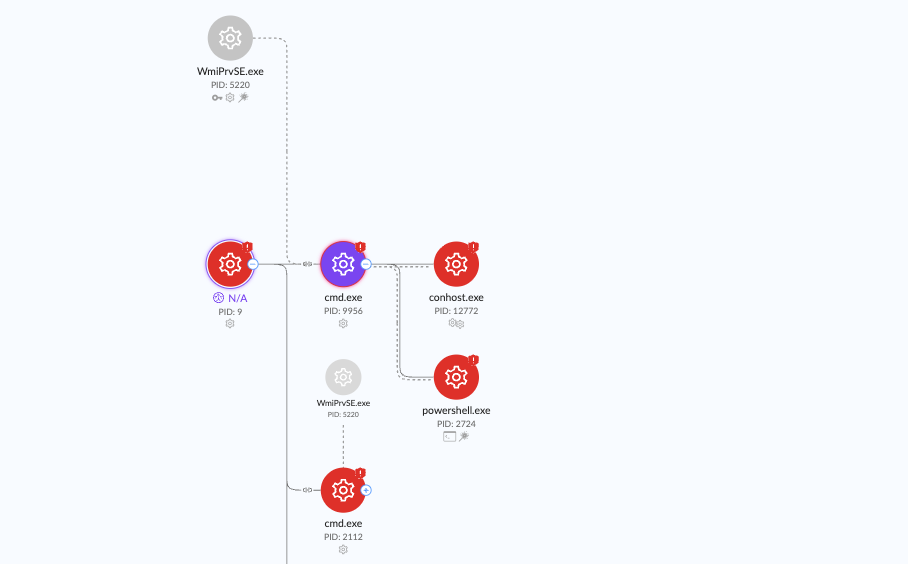
cmd.exe /Q /c reg save hklm\sam C:\<file>.dmp 1> \\127.0.0.1\ADMIN$\__1780085507.2731407 2>&1The console's process tree shows the lineage: WmiPrvSE.exe spawning the cmd.exe capture shell, which spawns conhost.exe and the powershell.exe that ran the Defender command.
What didn't show up
The parent process, in the query results. The tree above shows WmiPrvSE.exe as the parent, but the src.process.parent fields came back empty in PowerQuery for these events, so a parent-based hunt would have found nothing. The command-line redirect is the better signal anyway: it survives the operator moving off the loopback path or authenticating with a hash. Execution telemetry doesn't change between password and pass-the-hash auth, only the logon does.
From Hunt to Detection
The \ADMIN$\__ redirect is the chokepoint wmiexec can't drop, so the hunt query goes straight into a SentinelOne STAR rule unchanged:
src.process.cmdline contains "/Q /c" and src.process.cmdline contains "\\ADMIN$\\__"Legitimate software doesn't redirect output to \\...\ADMIN$\__<number>, so it runs at near zero false positives. Surveyor's --dv flag gives the same rule in Deep Visibility. For a second signal, the output file lands in C:\Windows as __<number> and is deleted right after the read, so a file-create rule on C:\Windows\__ catches it even when the command line is obfuscated.
References
- impacket - wmiexec.py
- Red Canary - Surveyor
- MITRE ATT&CK T1047 - Windows Management Instrumentation
- MITRE ATT&CK T1021.003 - DCOM
- MITRE ATT&CK T1021.002 - SMB/Windows Admin Shares
Comments