Threat Hunt
Hypothesis
Unsigned binaries and DLLs appearing in ProgramData subfolders that don't belong to known, installed software indicate DLL sideloading activity.
Method
LCQL query across all customer orgs for unsigned CODE_IDENTITY events in ProgramData over 14 days, triaged in DataWrangler by deduplicating on the first ProgramData subfolder.
Findings
True positive. Found a DeerStealer variant delivered via MSI, using a Comodo-signed binary (EngineX_Co64.exe) sideloading cmdres.dll, with HijackLoader injecting DeerStealer into a hollowed Q-Dir process.
Platform
LimaCharlie EDR, Jupyter Notebook, Pandas, DataWrangler
MITRE ATT&CK
T1218.007
T1574.002
T1036.005
T1555.003
T1539
DeerStealer is an infostealer being delivered through DLL sideloading with legitimate, vendor-signed binaries. Red Canary documented one variant using this technique, and the sideloading vector is tracked on HijackLibs. Reading that report, I wanted to hunt for this pattern in my own telemetry. This is what that hunt looked like: how I built the queries, the noise I hit, how I narrowed it down, and what I found.
The Technique
DLL sideloading takes advantage of how Windows resolves DLL dependencies. When an application loads a DLL by name, Windows checks the application's directory before system directories. Attackers exploit this by placing a malicious DLL with an expected name alongside a legitimate binary. The binary runs, looks for the DLL it depends on, finds the attacker's version sitting right next to it, and loads it. There's no exploitation or vulnerability involved, it's just how Windows DLL resolution works by design.
In these DeerStealer campaigns, the delivery comes through MSI installers. The MSI drops a legitimate vendor-signed binary alongside a malicious DLL into a directory it doesn't belong in. The binary doesn't need to be renamed or modified, it just needs to be somewhere it shouldn't be with the right DLL waiting for it. The binary is legitimately signed, but the path it's running from is wrong.
Starting from Intel
The Red Canary report gave me the specific instance, but to turn it into a hunt I needed to extract the behavior from the IOCs. What's the pattern that would be consistent across campaigns regardless of which signed binary or DLL they use?
The consistent behavior is MSI-delivered payloads dropping components into ProgramData subfolders. Legitimate software uses well-known ProgramData subfolders that match their vendor name, so an unknown folder with unsigned DLLs in it is worth investigating. The sideloaded DLL in these chains is always unsigned, even though the binary loading it is legitimately signed. That's the differentiator.
The hypothesis:
Unsigned binaries and DLLs appearing in ProgramData that don't belong to known, installed software.
Building the Hunt
I ran this hunt across all customer organizations using a Jupyter notebook that queries LCQL in parallel across every org my API key has access to, collects results into a Pandas DataFrame, and exports to CSV. The notebook uses the LimaCharlie SDK's userAccessibleOrgs() to auto-discover orgs, so there's no per-org configuration needed.
The query I ran across all orgs for a 14-day window:
-336h | plat == windows | CODE_IDENTITY | event/FILE_PATH contains 'ProgramData' and event/SIGNATURE/FILE_IS_SIGNED != 1CODE_IDENTITY events fire once per unique hash+path combination. I targeted ProgramData because the intel showed the sideloading chain dropping components to non-standard directories, and filtered to unsigned binaries for the reason described above.
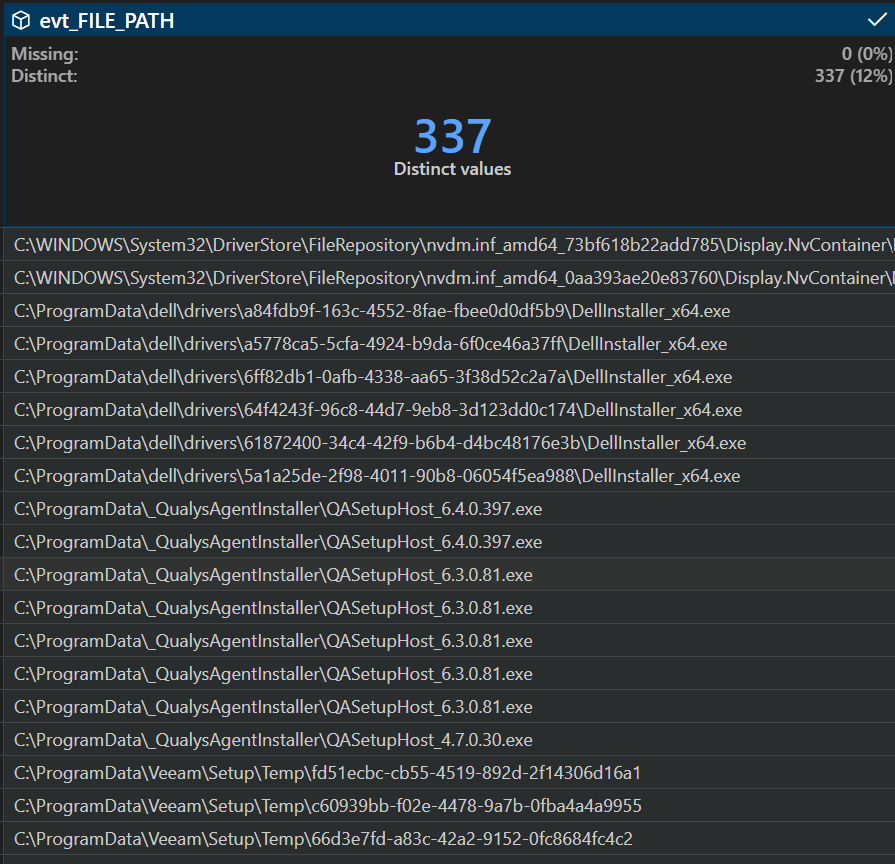
Across all orgs over 14 days, the query returned 2,821 events. The bulk came from customers with a lot of unsigned components in ProgramData\Package Cache\, vendor update folders, and RMM agent directories. That's normal, a lot of legitimate software drops unsigned components to ProgramData.
Triaging in DataWrangler
The notebook exports the expanded DataFrame (JSON event fields flattened into columns) to CSV. I opened that in VS Code's DataWrangler. 2,821 rows is too many to scroll through, but the triage is straightforward: extract the first subfolder under ProgramData from each file path, filter out known customer-specific software, and deduplicate on the folder name.
# DataWrangler steps applied to the exported CSV:

# 1. Filter out known customer-specific software paths
df = df[~df['evt_FILE_PATH'].str.contains("customer_software", case=False, na=False)]

# 2. Extract the first folder under ProgramData
df['ProgramData_Folder'] = df['evt_FILE_PATH'].str.extract(r'ProgramData\\([^\\]+)')

# 3. Deduplicate on that folder name
df = df.drop_duplicates(subset=['ProgramData_Folder'])

# 4. Sort by file path to scan the list
df = df.sort_values('evt_FILE_PATH', ascending=False)
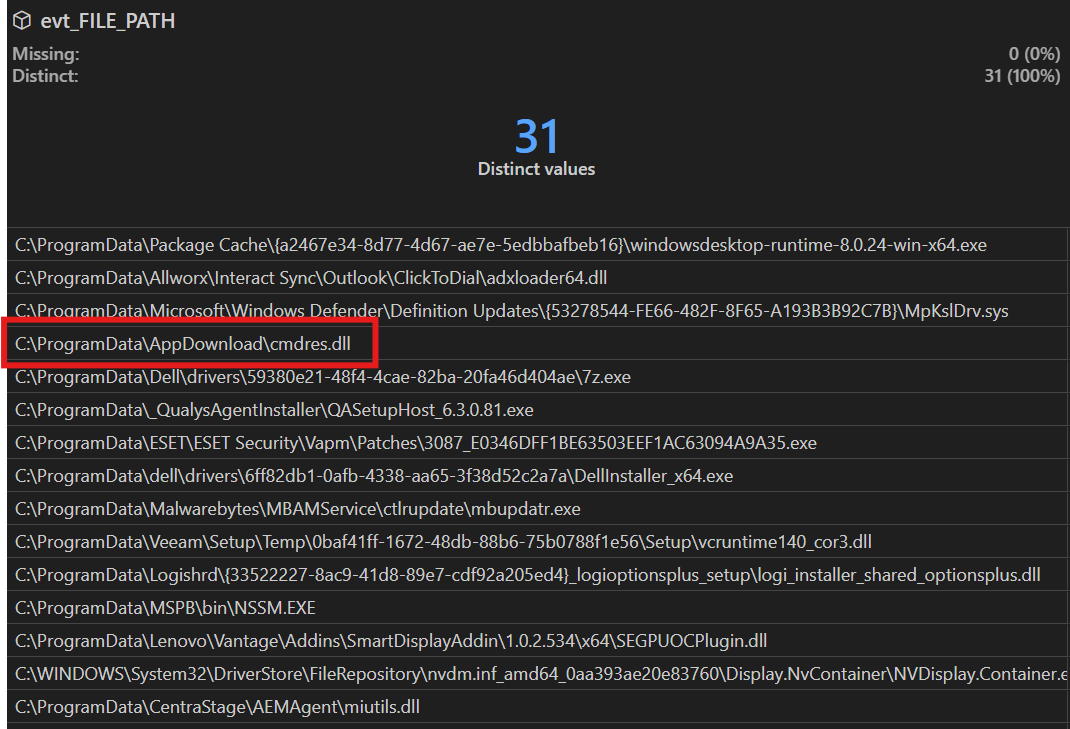
2,821 events compressed into a short list of unique ProgramData subfolders. Most are recognizable:
Package Cache- .NET runtimes, VC++ redists, Dell updatesDell- update service, driver downloadsQualys- agent serviceVeeam- backup setupLenovo- Vantage addinsMicrosoft- Defender definitionsMalwarebytes- service updatesCentraStage- RMM agentMSPB- RMM toolingAppDownload- ?
Every folder maps to a known vendor except one. AppDownload doesn't belong to any recognizable software, and it only showed up on one host in one org with a single unsigned DLL.
Pulling the thread
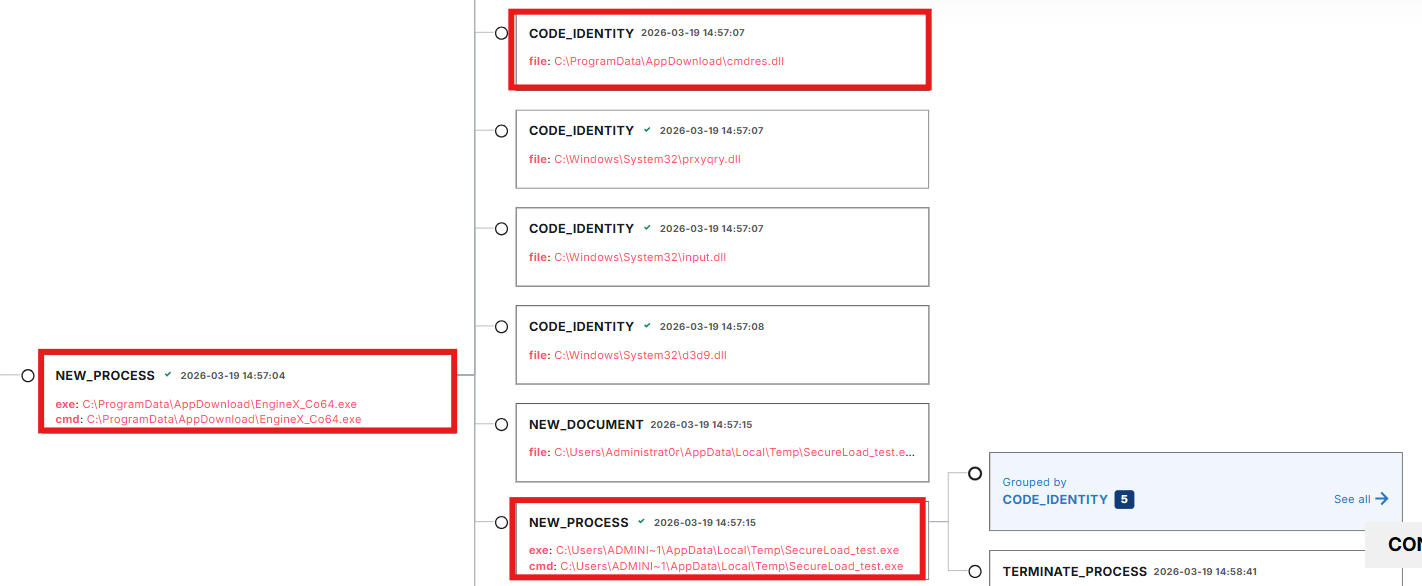
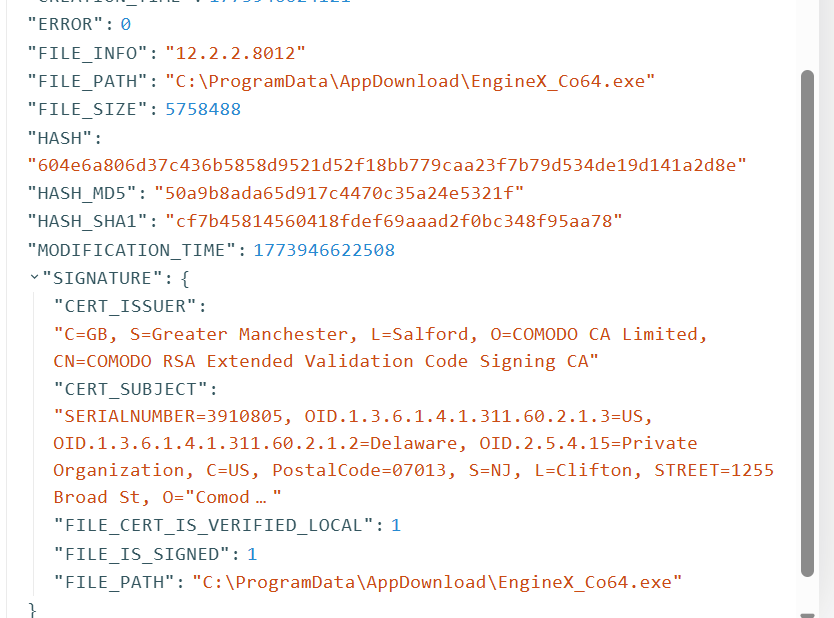
The event in C:\ProgramData\AppDownload\ was an unsigned DLL called cmdres.dll. I pivoted back into LimaCharlie's timeline for that host and pulled the full event history around that timestamp. That's where the kill chain became visible: msiexec.exe spawning EngineX_Co64.exe in a temp GUID folder, self-relocating to ProgramData\AppDownload\, loading cmdres.dll, and launching SecureLoad_test.exe.

What I Found
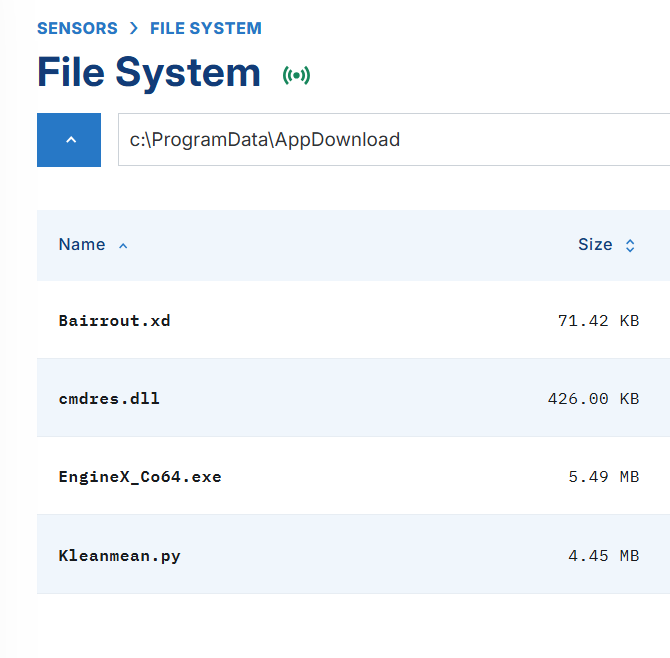
The AppDownload folder contained the full DeerStealer delivery chain:
em_73g2oeim_installer.msi
  └─ C:\Users\*\AppData\Local\Temp\{GUID}\EngineX_Co64.exe
      └─ C:\ProgramData\AppDownload\EngineX_Co64.exe  (Comodo-signed, legit)
          ├─ C:\ProgramData\AppDownload\cmdres.dll     (malicious sideloaded DLL)
          ├─ C:\ProgramData\AppDownload\Bairrout.xd    (encrypted HijackLoader shellcode)
          ├─ C:\ProgramData\AppDownload\Kleanmean.py   (HijackLoader config)
          └─ C:\Users\*\AppData\Local\Temp\SecureLoad_test.exe  (Q-Dir, injection target)
                └─ [DeerStealer injected into memory, never on disk as its own binary]
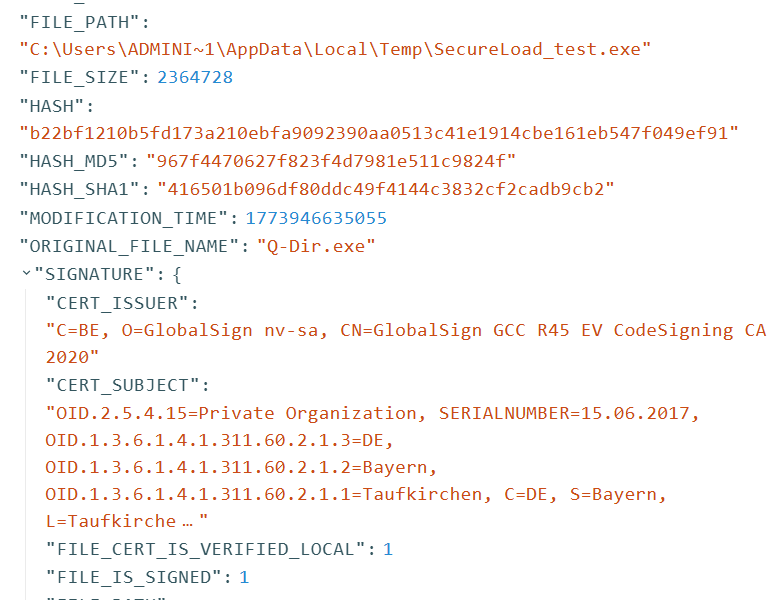
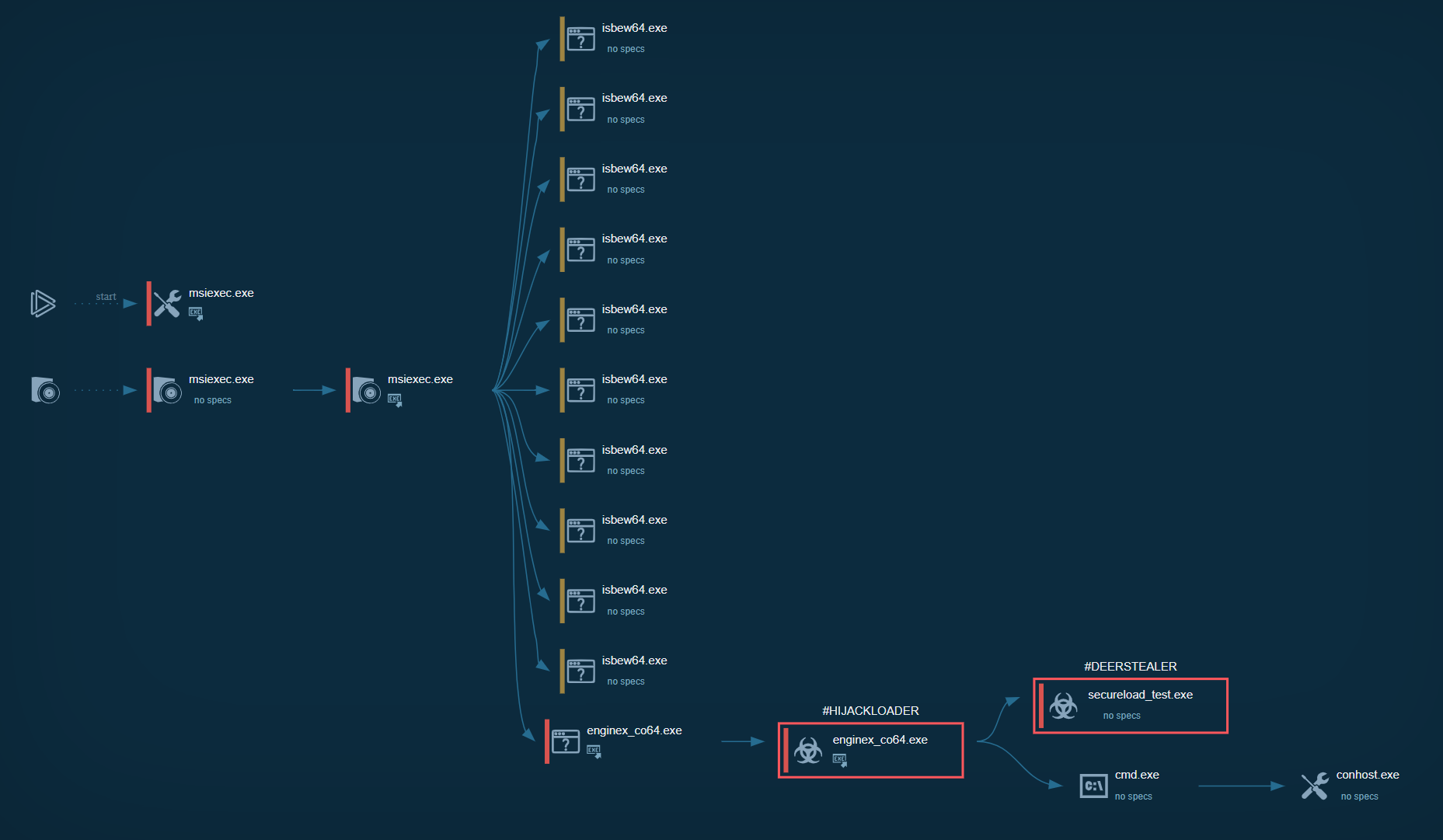
The MSI dropped a Comodo-signed binary (EngineX_Co64.exe), a malicious DLL (cmdres.dll), an encrypted payload (Bairrout.xd), and a HijackLoader config (Kleanmean.py) to C:\ProgramData\AppDownload\. When EngineX_Co64.exe executed, it sideloaded cmdres.dll, which decrypted shellcode from Bairrout.xd and loaded HijackLoader. HijackLoader then started SecureLoad_test.exe (a legitimate Q-Dir binary by Nenad Hrg) in a suspended state and injected the DeerStealer payload into it. DeerStealer never touches disk as its own executable — it only exists in memory inside the hollowed Q-Dir process.
Compare that to the Red Canary report: DicomPortable.exe (Apowersoft-signed) sideloading Qt5Core.dll. Different vendor binary, different DLL name, different file paths, but the same technique. The hunt query that found my variant would have caught theirs too, because both campaigns drop an unsigned sideloaded DLL to a non-standard ProgramData subfolder.
What It Looks Like in Telemetry
Here's what each stage of the chain looks like from the EDR side, and what to look for if you're hunting this in your own telemetry.
MSI Delivery
The delivery uses ClickFix: a phishing page that prompts the victim to paste a PowerShell command into the Windows Run prompt. That command uses curl.exe to download the MSI and msiexec.exe to install it. When the MSI executes, it drops EngineX_Co64.exe to a temp GUID folder, then relocates it to C:\ProgramData\AppDownload\ alongside the other components.
In the telemetry, the temp path showed up as C:\Users\ADMINI~1\AppData\Local\Temp\{GUID}\ rather than the full username. That's a Windows 8.3 short filename, a shortened alias Windows generates for directory names longer than 8 characters (first 6 characters + ~1). If you're building path-based queries, account for this. A string match looking for a specific username will miss the event if the telemetry captured the short name. msiexec.exe in particular tends to resolve paths this way.

Signed Binary and DLL Sideload
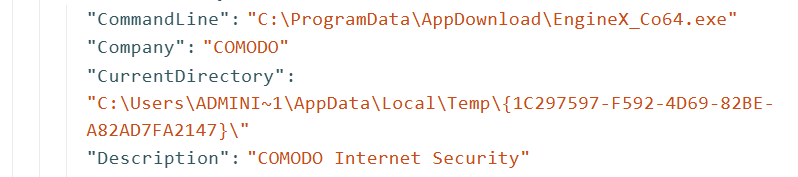
EngineX_Co64.exe is a legitimate Comodo binary (VT). The process telemetry shows it first executing from the temp GUID folder, then spawning itself from C:\ProgramData\AppDownload\ with the same hash but a different path. A signed binary relocating itself and re-launching from a new directory is suspicious behavior on its own.
Sysmon Event ID 1 for this process:
"Description": "COMODO Internet Security",
"Product": "COMODO Internet Security",
"Company": "COMODO",
"Image": "C:\\ProgramData\\AppDownload\\EngineX_Co64.exe"
COMODO Internet Security installs to C:\Program Files\COMODO\, not ProgramData\AppDownload\, so seeing this binary run from that path is immediately suspicious. Once running, it loads cmdres.dll (VT) from the same directory — that's the sideload. The legitimate version of cmdres.dll is a signed Comodo DLL. The version dropped by the MSI is unsigned and contains a CRT hook that redirects execution into the decryption and loading chain.

HijackLoader to DeerStealer
Once cmdres.dll loads, it decrypts shellcode from Bairrout.xd and loads HijackLoader. HijackLoader reads its configuration from Kleanmean.py, then starts SecureLoad_test.exe (VT) in a suspended state and injects DeerStealer into it. eSentire covers the full decryption chain, module stomping, and injection mechanics in detail.
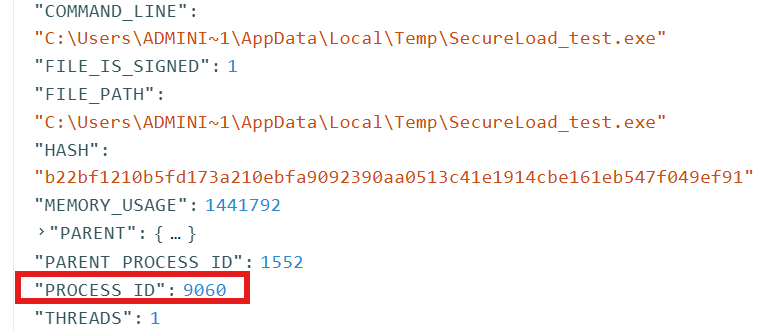
SecureLoad_test.exe is not DeerStealer itself. It's Q-Dir, a legitimate file manager signed by Nenad Hrg (softwareok.com), with the OriginalFileName Q-Dir.exe in the PE header. HijackLoader starts it suspended and injects DeerStealer into its memory space, so the Q-Dir code never actually executes. In your process list and EDR telemetry it looks like a signed, legitimate binary, but the code running in memory is DeerStealer. The entire kill chain abuses signed binaries at every stage — code signing alone tells you nothing about whether the activity is malicious.
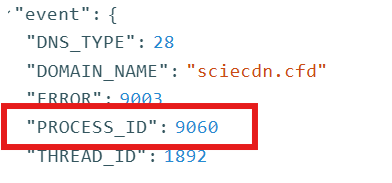
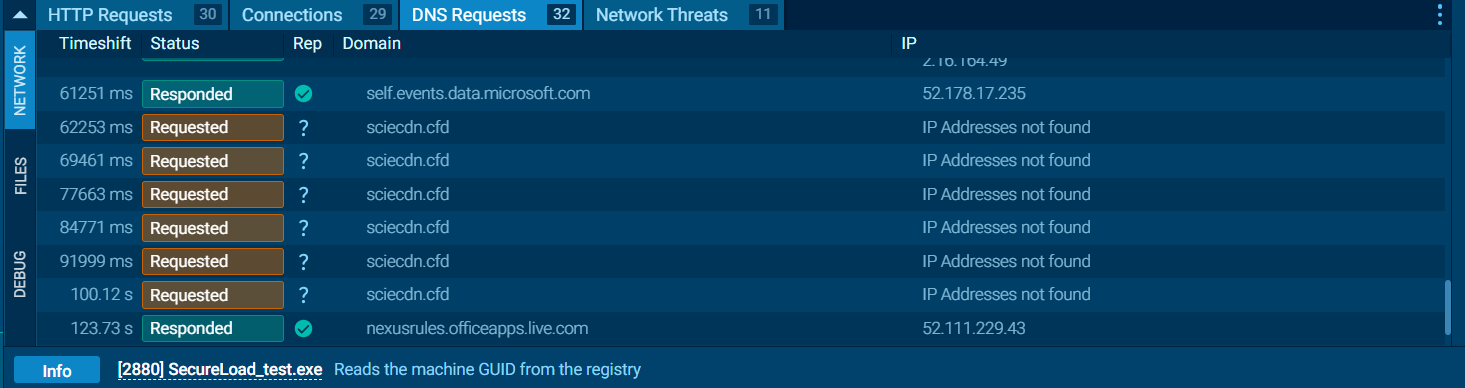
The confirmation came from DNS. SecureLoad_test.exe made a DNS request to sciecdn[.]cfd, a domain that correlates to DeerStealer C2 infrastructure on VirusTotal. The DNS request's PPID traces back to the same PID as the SecureLoad_test.exe process — the injected payload calling home from inside the hollowed binary.
DeerStealer is a full-featured stealer-as-a-service. It targets 50+ browsers, 800+ browser extensions (crypto wallets, password managers, 2FA apps), desktop crypto wallets (Exodus, Electrum, etc.), Discord, Telegram, FTP clients, VPN clients, and email clients. Higher subscription tiers include a cryptocurrency clipboard hijacker, hidden VNC, and live keylogging. If your detections didn't catch the sideload or MSI delivery, behavioral indicators like browser credential store access and C2 communication are your last line of detection.
Sandbox Analysis
The Any.Run sandbox analysis has the full behavioral breakdown from MSI installation through DeerStealer deployment.
IOCs
| Indicator | Type | Description |
|---|---|---|
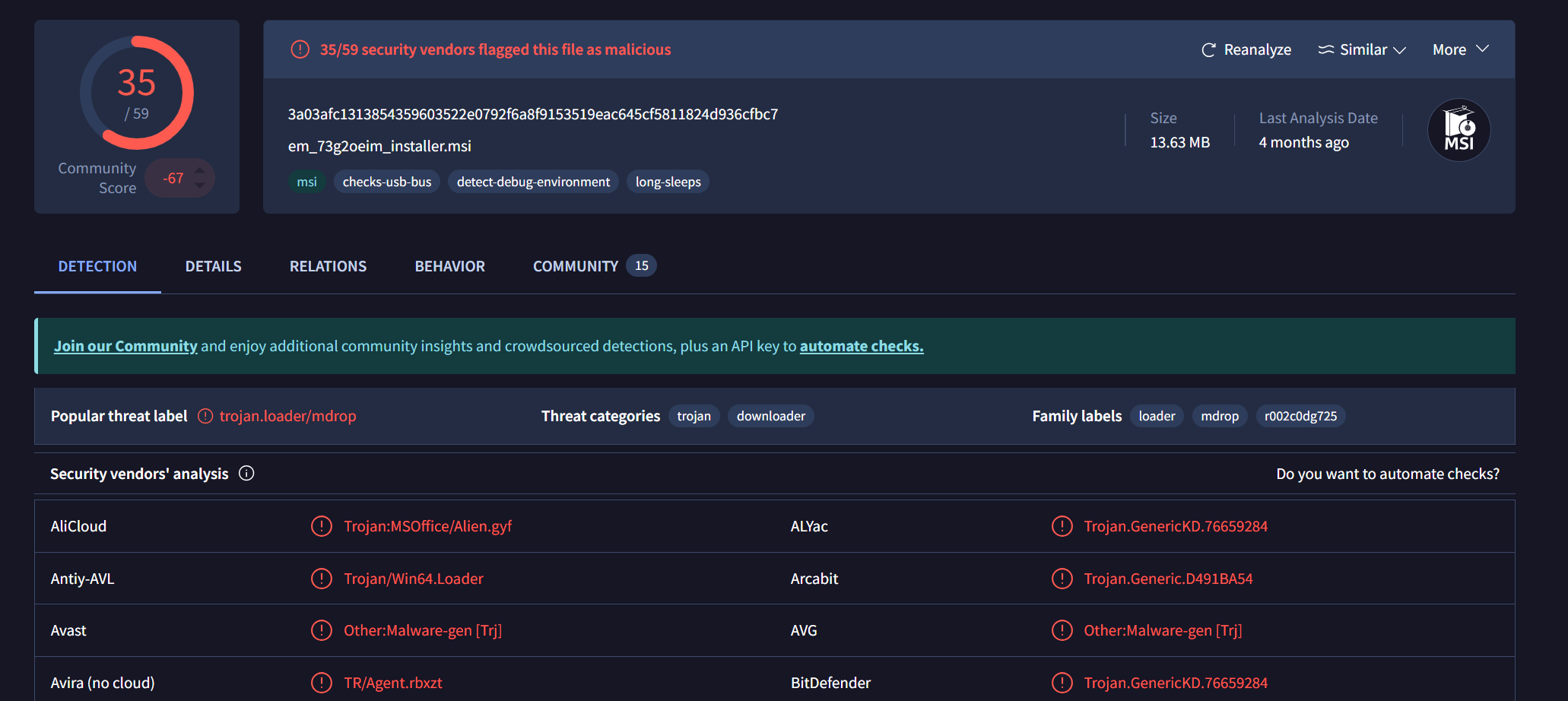
3a03afc1313854359603522e0792f6a8f9153519eac645cf5811824d936cfbc7 |
SHA256 | em_73g2oeim_installer.msi (HijackLoader MSI) |
604e6a806d37c436b5858d9521d52f18bb779caa23f7b79d534de19d141a2d8e |
SHA256 | EngineX_Co64.exe (Comodo-signed binary) |
ce42ad239d792eee8ddc114e5fa33cd11c8f1eaa4c254988bc98f392f90c7f9f |
SHA256 | cmdres.dll (malicious sideloaded DLL) |
b22bf1210b5fd173a210ebfa9092390aa0513c41e1914cbe161eb547f049ef91 |
SHA256 | SecureLoad_test.exe (DeerStealer injection target) |
sciecdn.cfd |
Domain | DeerStealer C2 domain (DNS request from injected SecureLoad_test.exe) |
Full IOC list from eSentire: eSentire DeerStealer IOCs on GitHub
MITRE ATT&CK
- T1218.007 - System Binary Proxy Execution: Msiexec
- T1574.002 - Hijack Execution Flow: DLL Side-Loading
- T1036.005 - Masquerading: Match Legitimate Name or Location
- T1555.003 - Credentials from Password Stores: Credentials from Web Browsers
- T1539 - Steal Web Session Cookie
From Sideloading to Stealer
The unsigned-DLLs-in-ProgramData query is broad. Across thousands of customers it's going to return a lot of legitimate software, and stacking by folder name helps but you'll still need to triage. The query gets you into the right neighborhood, but it doesn't hand you the finding.
To hunt specifically for DeerStealer or any infostealer delivered through sideloading, you need a second step: look at what those processes did after they started running. DeerStealer reads browser credential stores, and that's where you pivot.
Look for file access events targeting browser credential paths from processes running outside Program Files:
\Google\Chrome\User Data\Default\Login Data\Google\Chrome\User Data\Default\Cookies\Google\Chrome\User Data\Default\Web Data\Microsoft\Edge\User Data\Default\Login Data\Mozilla\Firefox\Profiles\*\logins.json
A process running from ProgramData\AppDownload\ or a user temp directory that's reading Chrome's Login Data is an infostealer. Legitimate software doesn't do that, so the combination of non-standard execution path plus browser credential store access is high-fidelity regardless of which stealer family it is.
You can also approach it from the other direction. Start from credential store access events and work backward to the process. If the process that read Login Data is running from temp, ProgramData, or any user-writable path outside its vendor's install directory, that's your finding.
Takeaways
DLL sideloading through signed binaries isn't going away. The HijackLibs project tracks known sideloading targets, and the list keeps growing. The artifacts change between campaigns — different signed binaries, different DLL names, different hashes — but the delivery mechanism stays the same: MSI to temp to execution.
The unsigned-DLLs-in-ProgramData query I walked through here is a starting point, not a precision tool. At scale, pair it with a second layer: hunting for known sideloading targets from HijackLibs executing from non-standard paths, hunting for the self-relocation behavior (same hash, different paths between parent and child), or pivoting into browser credential store access as described above.
Whatever EDR you're working with, the approach is the same. No single query returns only evil, but you iterate, you triage, and you use what you know about the threat's behavior to narrow the field until the signal separates from the noise.
References
- Red Canary - Phishing for RMM Tools - DicomPortable.exe / Qt5Core.dll sideloading variant
- eSentire - DeerStealer Analysis - Full decryption chain, module stomping, and injection mechanics
- eSentire DeerStealer IOCs on GitHub
- HijackLibs - Qt5Core.dll - Known DLL sideloading target
- HijackLibs Project - Community-maintained DLL sideloading target database
- Any.Run Sandbox Analysis - Full behavioral breakdown of the MSI installer
Comments